
Design Apps and websites at your fingertips sounds so easy and it is.
I was pleased to see Terry Sapienza’s article in the Washington Post, Home section. I had written a blog post here, coincidentally nearly one year ago to the day, about Benjamin Moore’s color selector, Looking for the Right Color, when just a few design apps existed. Now, there are so many more that help beyond paint choices. The Post article does a good job in their selection but out of these and with a few design programs not mentioned, I’ll describe what we use and like the most.
Design Apps We Like Best and Use the Most
- 1) Houzz — love it for quick views of over 40,000 interior images. As the Post describes, it is “interior eye candy.” We’re a member of the Houzz community and have a profile but we really enjoy getting the updates from regular Houzz bloggers on such topics built-in beds, best solutions for small rooms and everything else that you can think of that you might want to know about interior design. Here’s an ideabook from licksandgiggles on luscious designer room. You never know what you’re going to find. This is a great online community and app for professionals as well as home dwellers and bloggers. We often cite and refer back to these posts with pictures in our blog. Free.
- 2) Remodelista — A design sourcebook is the one that the Post says of all the ones that they recommend, they would get this one. It offers inspirations, daily postings, the 10 best products from over 100 categories. We haven’t joined this one — yet, but good to know. Cost is $3
- 3) HGTV — Even though I like some of the ideas here, but do not have a lot of time to watch their shows, I find their website to be not all the user-friendly for searches. Maybe their app is more so. Free.
- Note) Moodboard Pro — This video shows how it works best for the iPad. Cost is $7. Save your money and join this community below.
Design Sites
- 4) Olioboard — They don’t have a mobile app yet and I hope they get one soon but until they do, I have found this to be the best moodboard source for designers and interior design enthusiasts. Here’s the previous post that I wrote about Olioboard. We’re listed under one of their wallpaper companies and we’re slowly uploading more images for folks to use in their own moodboards. Here’s our profile. Like Facebook, you can follow other designers and they can follow you. What makes this site so great is there are so many ways to filter your search by color, item, product category, sets, etc., and you can even add items from the Internet that you don’t find. These become part of your library that you can keep private or make public for others to use as well. I did the board below recently and have had the most fun with this program. I highly recommend it for designers as well as anyone who is thinking about changing up their space and wants to get a sense of the overall layout, look and feel before doing so. Some of these boards are truly inspirational. Mine are simple in comparison.

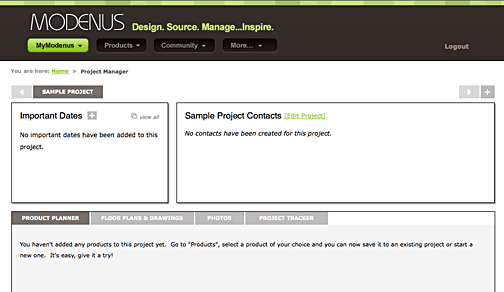
- 5) Modenus — Doesn’t have an app as well but we’re a member listed under walls and we just got the notice that they have launched a new Project Management application that allows interior designers to start and keep everything for a client online in one place. Documents can be uploaded and products and vendors for each project can be saved here as well as important contact information. Here’s what a blank one looks like. What a great tracking tool to keep projects organized. I wouldn’t be surprised if they’ll be coming out with an app soon.
Veronika Miller, the brain behind Modenus has a wonderfully informative blog about new products and the latest in the interior design world — worth checking out. We’ve enjoyed reading her many posts and especially those about wallpaper. What an assortment of which we are proud to be a part.
 6) House Keeper — Since I’m a practical person, I’ll just have to mention one more of the design apps on the Post’s list that sounds worthwhile. This app keeps track and alerts you to when it is time to take care of forgettable but necessary household chores, like changing the smoke detector battery, your AC filter, and anything else you want to record….Now, if it would only clean my house too. Cost $2.
All this app thinking makes me wish we could have one for Casart Coverings one day….I have some things in mind.
— Ashley










Leave a Reply